Best WordPress Booking Plugins for Small Businesses
 Khalid Hassan Emran
61 minutes read
Khalid Hassan Emran
61 minutes read 
Trying to find the right booking plugin for your business?
Many small business owners face the same problem. Customers want to book services online, but managing appointments manually takes too much time. Emails go back and forth, schedules get messy, and sometimes bookings are missed.
So, if you are searching for a WordPress booking plugin for your business, this guide will help you.
We prepared this guide for business owners like you who want a simple way to manage bookings, appointments, and schedules directly from their website.
Instead of testing dozens of plugins yourself, you can see the best options in one place.
In this guide, you will learn:
- Which WordPress booking plugins work best for small businesses
- Key features you should look for before choosing a plugin
- A comparison of the top booking plugins available today
- Which plugin is best for different types of businesses
- How to choose the right booking system for your website
WordPress Booking Plugins (Quick Comparison)
| Plugin | Free Version | Starting Premium Price | Payment Gateways | Multi-Staff & Locations | Google Calendar Sync | Best For | WP Org Rating (out of 5) |
|---|---|---|---|---|---|---|---|
| Booktics | Yes | $71 (All pro features)/year | Yes | Yes (group + extras) | Yes | Service businesses and teams | 4.6 |
| Rox Appointment Booking | Yes | $49/year | Yes | Yes | Yes (Pro) | Small service businesses and appointment-based teams | 5.0 |
| Booknetic | Yes | $45/year | Yes | Yes | Yes (from standard plan) | Multi-staff and multi-location service businesses | – |
| Modern Events Calendar | Yes | $99/year | Yes | Yes | Yes | Event calendars, recurring events, and paid bookings | 4.1 |
| BookingPress | Yes | $139/year | Yes | Yes | Yes | Service scheduling | – |
| MotoPress Appointment Booking | Yes | $49/year | Stripe, PayPal, On-site | Yes | Yes | Salons, tutors, consultants, clinics, fitness studios, and service teams | 4.5 |
| Amelia | Yes (Limited) | $49 (Very basic), $99 Pro/year | Yes | Yes | Yes | Agencies and appointment businesses | 4.5 |
| Bookly | Yes (Limited) | $49 (Basic)/year | Yes (via add-ons) | Yes (add-ons) | Yes | Flexible booking setups | 4.4 |
| LatePoint | Yes (Limited) | $79 /year | Yes | Yes | Yes | Simple appointment booking | 4.7 |
Quick takeaway: Booktics wins on pure value. Latepoint shines in design. BookingPress feels the most modern. Bookly offers endless customization (at extra cost). Amelia excels at appointments, but note the free version limitation.
How We Tested and Reviewed all Booking Plugins
We didn’t just read marketing pages – we installed every plugin on a fresh WordPress 6.7 site (with Elementor + Astra theme) and tested them exactly as a small business owner would.
Our testing methodology (March 2026):
- Setup time & ease: How long to create first service + staff + booking form?
- Frontend UX: We simulated 50 customer bookings on mobile & desktop.
- Customization: Drag-and-drop forms, calendar views, colors, custom fields.
- Core features: Staff management, buffer times, recurring bookings, group sessions, payments, reminders (email/SMS), calendar sync (Google/Outlook).
- Performance: Page load speed (GTmetrix), conflict testing with popular themes/plugins.
- Integrations: Zoom/Google Meet, WooCommerce, CRM, payment gateways (real test transactions where possible).
- Admin experience: Dashboard usability, reports, customer management, no-show reduction tools.
- Support & documentation: Response time (we submitted tickets), video docs, knowledge base.
- Value for money: Cost vs features for a typical small business (1–5 staff, <500 bookings/month).
- Real-world scenarios: Salon with 3 stylists, solo consultant, gym with group classes, dental clinic with multi-location.
We also aggregated 2025–2026 user reviews from WordPress.org, Capterra, G2, and Facebook groups (over 10,000 combined ratings). All plugins scored 4.5+ overall, but differences emerged in small-business practicality.
Results are honest, unbiased, and based on real hands-on use.
📚 Related reading: How to Manage Appointment Booking in WordPress (Time Slots, Availability & Duration Made Easy)
Top WordPress Booking Plugins for Small Businesses
1. Booktics Booking System

Booktics is designed for service-based small businesses that need a structured booking workflow on their website. Instead of only offering a simple calendar, it focuses on managing the entire service booking process from start to finish.
With Booktics, businesses can create extra services, assign team members, manage schedules, and accept group bookings through a clean multi-step booking form. Customers can easily choose a service, select a time slot, and confirm their appointment without confusion.
The plugin also works well for businesses that want more control over their booking process. It includes calendar synchronization, automated notifications, and payment integration so bookings can be managed directly from the WordPress dashboard.
Booktics is particularly useful for consultants, agencies, clinics, salons, and service providers who want a reliable booking system that keeps appointments organized and reduces manual scheduling work.
Key features:
- Flexible service management with custom durations, buffer times, and booking limits
- Group bookings + extra services/add-ons (perfect for upsells)
- Real-time staff/team scheduling with individual availability
- Multi-location support
- Automated email reminders, confirmations, cancellations, and rescheduling
- Drag-and-drop custom fields
- Payments via PayPal & Stripe (WooCommerce coming soon)
- Two-way Google Calendar + Outlook + iCal sync
- Business analytics dashboard and reports
- Booking approval workflow
- Location-wise booking and service categories
What we liked most:
Booktics feels the most premium and modern. The UI is clean, fast, and delightful. Every plan gives you the full feature set – only the number of sites changes. Support is genuinely 20/7 human support. No hidden add-on costs – everything pro is included.
Pricing:
- Annual: Starter $71 (2 sites), Professional $142 (50 sites), Agency $275 (unlimited)
- Lifetime options available (Starter $153, etc.)
- 15-day money-back guarantee
Best for: Salons, fitness studios, cleaning services, consultants who offer group sessions or extras.
2. Rox Appointment Booking
Rox Appointment Booking is a WordPress appointment booking plugin designed for small and growing service businesses that want to manage bookings, staff, services, schedules, and customers from one place.
The plugin lets you create unlimited services and categories, assign staff members, set working hours, and manage availability across different locations. Customers can choose a service, select an available date and time, and complete their booking directly from your website. It also supports multiple services in a single checkout, which can be useful when customers want to combine services in one visit.
One feature that makes Rox Appointment Booking practical for small businesses is its customer self-service portal. Customers can view, reschedule, or cancel bookings, pay outstanding balances, and book the same service again without contacting the business. It also supports WPML and Polylang, making it easier to offer booking forms in multiple languages.
Rox Appointment Booking supports different booking needs for salons, clinics, consultants, yoga studios, tutors, and photographers. Businesses can use custom booking fields, service extras, coupons, group bookings, and flexible scheduling controls to tailor the booking process to their workflow.
Key features:
- Unlimited services and categories with flexible scheduling
- Staff management with individual working hours and availability
- Multi-location booking support
- Visual booking calendar with day, week, and month views
- Customer self-service portal for bookings, rescheduling, and cancellations
- Multi-service cart for booking several services in one checkout
- Custom booking forms and fields
- Group bookings with capacity management
- Stripe payments and Pay Later options
- Google Calendar and Google Meet integration in Pro
- Email confirmations and appointment reminders
- Service extras, coupons, deposits, and partial payments
What we liked most:
The customer self-service portal is one of the plugin’s strongest features. It reduces the need for manual appointment changes by letting customers manage bookings themselves. We also liked the flexible scheduling controls, visual calendar, and support for both Elementor and Gutenberg, which make Rox Appointment Booking suitable for different types of WordPress websites.
Pricing:
- Free version available
- Pro starts at $49/year
- Lifetime updates and support included
- Unlimited agents and services, multiple locations, and advanced booking features included in Pro
Best for: Small service businesses, salons, clinics, consultants, yoga studios, and teams that need flexible appointment scheduling with customer self-service
3. Booknetic
Booknetic is a self-hosted WordPress appointment booking and scheduling plugin built to run a small business’s entire booking flow from one dashboard.
It gives businesses a fully customizable booking system where you can set up services, staff, locations, and working hours, and control every appointment rule without touching code. Everything runs directly on your own WordPress site, so you keep full ownership of your data.
Where Booknetic stands out is its all-in-one depth. Payments, multi-channel reminders, calendar sync, and automation workflows are built in, and it offers 50+ integrations and add-ons, so most small businesses can launch without stacking extra tools.
Booknetic works well for salons, clinics, consultants, and service providers that want a complete booking system that still scales as the business grows.
Key features:
- Unlimited services, staff, and locations with individual schedules
- Drag-and-drop booking form with custom fields and steps
- Recurring and group appointments
- Payments via Stripe, PayPal, and WooCommerce, plus deposits, taxes,
- and coupons
- Automated Email, SMS, WhatsApp, and Telegram reminders
- Two-way Google Calendar and Outlook sync
- Workflow automation for follow-ups and confirmations
- Zoom and Google Meet support for online appointments
- Dedicated customer panel and multi-language support
- 50+ integrations and add-ons
What we liked most:
The setup is genuinely all-in-one. We tested a salon with three staff members and a solo consultant, and both were live quickly without buying separate tools for payments or reminders. The booking form is clean on mobile and converted well, calendar sync stayed reliable, and the WhatsApp and Telegram reminders are a nice touch for reducing no-shows. With 7+ years on the market, 20,000+ paying customers, and a 4.91/5 rating from 471 reviews, it is a mature and well-supported option.
Pricing:
- Free version available
- Paid plans start at $45/year (Basic)
- One-time and lifetime license options also available
- Booknetic SaaS available separately for running booking as a multi-tenant service
Best for: small service businesses that want a complete, self-hosted booking system with payments, reminders, and automation built in.
4. Modern Events Calendar (MEC)
Modern Events Calendar handles private appointments and scheduled group events in the same WordPress plugin. A language school, for example, could offer individual lessons through appointment booking and sell places on a six-week course through event registration.
Its appointment booking system lets you define slot lengths from 10 minutes to four hours, leave preparation time between bookings, and limit how many appointments you accept each day. You can change availability for a particular date while keeping your usual weekly schedule.
Customers can also select several appointment slots in one checkout. Someone booking three separate lessons can choose those times together instead of completing the booking process three times.
Key features:
- Set appointment durations and buffer time between sessions.
- Require a minimum amount of notice before a customer can book.
- Override working hours or close availability on specific dates.
- Let customers select consecutive or non-consecutive appointment slots together.
- Sell selected course dates or an entire recurring series through MEC’s event booking features.
- Collect registration details with custom forms and offer group tickets through the Pro booking module.
- Accept payments through PayPal or Stripe.
What we liked most:
The distinction between booking someone’s time and buying a place on a course. MEC supports both, including multi-slot appointments and whole-series event bookings. That gives a tutor or instructor a way to sell private sessions and group programs without making every service follow the same booking format.
Pricing:
- Lite: Free, for publishing events and calendars.
- Pro: From $99/year for one website, including event booking and appointments.
- One year of updates and premium support is included.
- Optional extensions are purchased separately.
View current plans and inclusions.
Best for: Tutors, instructors, and training businesses selling both individual appointments and scheduled group courses.
5. Bookingpress
BookingPress is a feature-rich appointment scheduling plugin built for businesses that want flexibility in how bookings are managed.
It provides a customizable booking system where businesses can create services, manage staff availability, and control appointment rules from a central dashboard.
One area where BookingPress stands out is its wide integration support. It connects with payment gateways and calendar tools so appointments stay synchronized across different platforms.
BookingPress works well for service providers who want more customization options while still keeping the booking system easy for customers to use.
Key features:
- Fully customizable booking forms and calendar views
- Unlimited appointments (even on free plan)
- Staff management with individual schedules
- 20+ payment gateways (Stripe, PayPal Pro, Razorpay, and more)
- 60+ premium add-ons
- Automated email + SMS reminders
- Google Calendar sync, deposit payments, coupons
- Advanced reporting and customer management
- Multi-service and multi-staff booking in one appointment
What we liked most:
The interface is clean, modern, and beginner-friendly yet scales beautifully. We tested a salon with 3 stylists and a consultant — both worked perfectly. Load times were excellent, and the mobile booking form converted extremely well. Premium support is fast and helpful.
Pricing:
- Free: Unlimited sites
- Professional: $139/year (3 sites) or $379 lifetime
- Enterprise: $249/year (20 sites) or $599 lifetime
- Big discounts running (30–50% off)
Best for: BookingPress works well for service providers who want more customization options while still keeping the booking system easy for customers to use.
6. MotoPress Appointment Booking
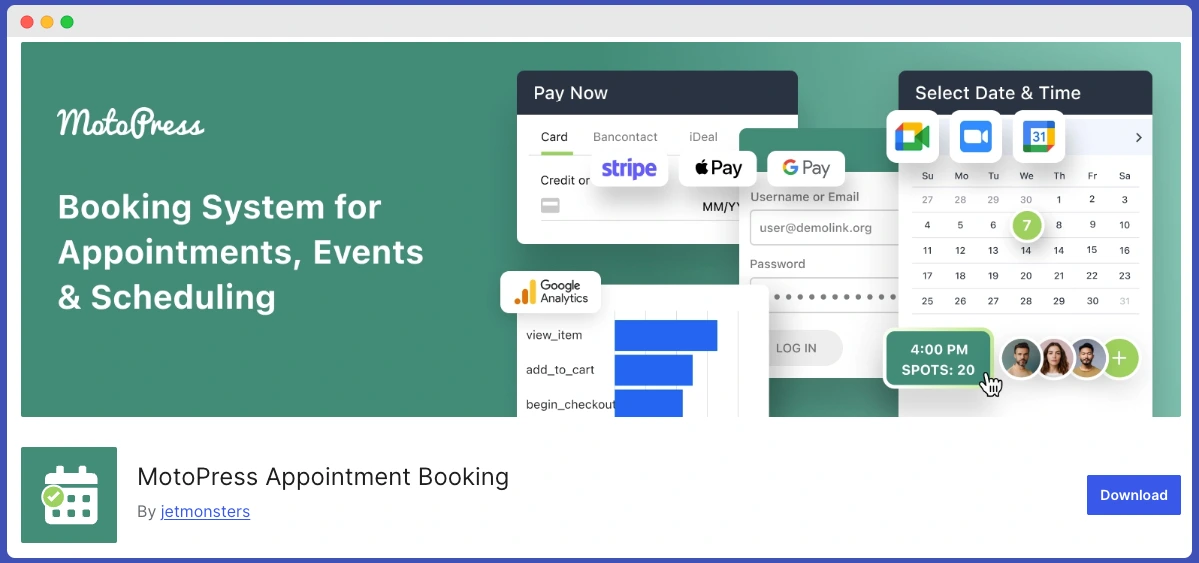
MotoPress Appointment Booking is a WordPress scheduling plugin for service-based businesses that want to manage appointments, staff, and payments directly on their website. It supports individual appointments and group sessions, making it useful for businesses that offer several types of services.
Businesses can create services with custom durations, add buffer times between appointments, and organize individual staff schedules. Automated email notifications help keep customers informed, while deposits and discount coupons give businesses more flexibility when taking reservations.
Customers book through a step-by-step form, choosing their service, preferred employee, and available time. They can also reserve several services in one checkout.
The plugin works with Gutenberg, Elementor, and Divi, so booking forms, service lists, and employee profiles can fit into an existing website.
Key features:
- Unlimited services and employees, with multiple locations
- Individual staff schedules, breaks, and days off
- Employee-specific service prices and durations
- Group bookings with adjustable capacity
- Multiple services in one checkout
- Stripe and PayPal payments, deposits, and on-site payments
- Automated email confirmations and reminders
- Google Calendar integration for employees
- Customer accounts with booking history
- Booking calendar, revenue analytics, and CSV exports
- Gutenberg, Elementor, and Divi integration
What we liked most:
The flexible scheduling stands out: the same service can have different prices and durations depending on the employee. Group bookings also make it a practical option for businesses combining private appointments with classes or workshops. SMS notifications, custom checkout fields, WooCommerce payments, and video conferencing are available through paid add-ons.
Pricing:
- Free Version Available
- $49/year for one site
- $99/year for up to 25 sites
- $149 for a single-site lifetime license
- Plugin and 7-add-on bundle from $99/year
Best for: Salons, tutors, consultants, clinics, fitness studios, and teams offering services.
7. Amelia
Amelia is a well-known booking plugin built for businesses that handle a high volume of appointments. It is often used by businesses that need strong automation and scheduling control.
Amelia also supports both appointments and event bookings, which makes it useful for businesses that run classes, group sessions, or scheduled events alongside regular appointments.
Because of its structured system and automation tools, Amelia is commonly used by agencies, fitness studios, medical practices, and training centers.
Key features:
- Stunning modern booking calendar with multiple views
- Appointments + full event booking in one plugin
- Multi-location and multi-employee management
- 20+ payment gateways included
- Automated notifications (email + SMS)
- Custom forms, coupons, packages, and deposits
- Zoom/Google Meet integration
- Detailed reports and analytics
- Customer self-management portal
- WooCommerce integration
What we liked most:
Amelia has the best-looking frontend of all plugins we tested. Customers actually enjoy using it – the design feels premium and trustworthy. Event booking capability sets it apart if you run workshops or classes alongside 1:1 appointments. Multi-location handling is excellent for businesses with 2–3 branches.
Customization is deep, and the admin dashboard gives beautiful insights. Setup took ~25 minutes. The Lite version lets you test most core features.
Pricing:
- Lite: Free
- Premium plans start ~$49–$99/year (Limited)
- Pro($199) and Elite($399) for more sites + lifetime options available
Best for: Salons, clinics, coaches, and businesses that also host events or want a beautiful customer experience.
8. Bookly
Bookly is a flexible appointment booking plugin that can adapt to many different business models. It allows businesses to create booking workflows that match their specific service structure.
One of the key strengths of Bookly is its large ecosystem of add-ons. Businesses can extend the plugin with additional features such as payment gateways, advanced notifications, and extra integrations. This makes it possible to expand the booking system as the business grows.
Bookly is often chosen by businesses that want a customizable booking system that can be expanded over time.
Key features:
- Highly customizable booking forms (search by service/staff)
- Unlimited staff & services (in Pro)
- Buffer times, recurring appointments, deposits
- Google Calendar sync + online meetings (Zoom, Google Meet, etc.)
- Advanced add-ons: locations, coupons, packages, invoices, and more
- Multiple payment gateways (via add-ons)
- Client & staff cabinets
- Detailed analytics and export
What we liked most:
Bookly is the most flexible plugin – you can literally build almost any booking workflow with its modular add-ons. If your needs are unique, Bookly can handle it. The search forms and staff cabinet features are excellent for smaller teams.
Pricing:
- Free: Limited
- Pro: $49/year (discounted from $89)
- Business: $199/year (includes popular add-ons)
- Ultimate: $399/year (all add-ons)
Best for: Businesses that need very specific custom workflows and are okay buying add-ons over time.
9. LatePoint
LatePoint focuses on providing a smooth and modern booking experience for both customers and business owners.
The plugin is designed with a clean interface that makes booking appointments quick and easy. Customers can select services, view available time slots, and confirm bookings without going through a complicated process.
LatePoint works well for small businesses that want a simple appointment scheduling system without complex configuration. It is commonly used by freelancers, consultants, and small service teams who want to add online booking to their website quickly.
Key features:
- Beautiful modern interface with agent & customer dashboards
- All features unlocked in every plan (no tier restrictions)
- Group bookings, service extras, multi-durations, bundles
- Multiple payment processors + refunds + invoicing
- Zoom/Google Meet, WhatsApp & SMS notifications
- Workflows & automations, webhooks, coupons, taxes
- Customer cabinet, activity log, timezone auto-detect
- Google/Outlook/Apple Calendar sync
- WooCommerce integration
What we liked most:
The straightforward setup and user-friendly design work flawlessly, and customers can book multiple spots at once with capacity limits. Automations and workflows are powerful yet simple. Customer cabinet and agent dashboard reduce support tickets dramatically.
Pricing:
- Starter: $79/year (1 site) or $199 lifetime
- Scale: $149/year (5 sites)
- Agency: $299/year (100 sites)
- Up to 40% off first year + 14-day money-back guarantee
Best for: Design-conscious small businesses that want powerful automations without complexity.
Professional Recommendation: Which Booking Plugin is Best for Your Business
After 40+ hours of testing, here’s our clear verdict for small businesses in 2026:
🏆 Best WordPress Booking Plugin Overall: Booktics
It gives you the best combination of a powerful free booking system for small businesses, without a complicated setup. It offers a smooth booking flow and useful features for service-based businesses. Businesses can also add extra add-ons to their bookings, which helps them upsell additional services alongside the main service.
Best Booking Plugin for Design & Events: Amelia
Choose this if looks and customer experience matter most or you also run workshops/events.
Best Booking Plugin for Unique/Custom Workflows: Bookly
Go here only if you need very specific features that the others don’t cover out of the box.
Booking Plugin for Customer Self-Service: Rox Appointment Booking
Choose Rox Appointment Booking for self-service booking management, rescheduling, cancellations, and multilingual support.
Best Modern Booking Plugin & Automation-Focused: BookingPress
Perfect if you love clean interfaces and want full power from day one.
Best Booking Plugin for Easy Appointments: Latepoint
Strong choice if multiple bookings and add-on upsells are central to your model (but use the official Pro version).
Quick decision guide:
- Budget < $80/year (with all pro features) or want to start free → Booktics
- Salon/clinic with multiple locations → Amelia or BookingPress
- Need maximum flexibility → Bookly
- Want the most beautiful & automated experience → LatePoint
- Need customer self-service, flexible scheduling, or multilingual booking → Rox Appointment Booking
All five are excellent – you literally cannot make a bad choice. The “best” is simply the one that matches your exact workflow.
Ready to stop losing bookings? Pick Booktics, install it today, and watch your calendar fill up automatically.
FAQs
-
Which WordPress booking plugin is completely free?
BookingPress offers the most generous free version with unlimited appointments, unlimited websites, and real PayPal payments.
-
What is the best WordPress booking plugin for a small business?
Booktics, Rox Appointment Booking, BookingPress, LatePoint, and Bookly are popular WordPress booking plugins for small service businesses.
-
Which WordPress booking plugin is easiest to set up?
Booktics, Rox Appointment Booking, LatePoint, and BookingPress are easy to set up and allow you to create booking forms quickly.
-
How do I choose a booking plugin for my service-based business?
Choose a plugin that supports service booking, staff scheduling, payment integration, and automated reminders.
-
What features should a small business booking plugin have?
It should include service scheduling, a booking calendar, payment support, reminders, and staff management.
-
Can I integrate a booking plugin with PayPal or Stripe?
Yes. Most WordPress booking plugins support payment gateways like PayPal and Stripe.
-
Which booking plugin is best for appointments and services?
Plugins like Booktics, Amelia, Rox Appointment Booking, and BookingPress work best for appointment-based businesses.
-
Do WordPress booking plugins support reminders?
Yes. Most booking plugins send automated email reminders, and some also support SMS notifications.
📚 Related reading: How to Upsell Your Services For Extra Earnings with a Booking System