How to Build an Appointment Booking Strategy That Converts Leads into Clients
 Khalid Hassan Emran
25 minutes read
Khalid Hassan Emran
25 minutes read 
Did you know businesses with optimized appointment booking see 3x more conversions from leads?
However, most WordPress sites have trouble with this because of hard-to-use plugins and confusing buttons or links.
Without a clear plan for booking appointments, your process can get messy and slow. A very interesting appointment booking plan may lose interest if the booking is too hard.
In this guide, you will learn how to build an effective appointment booking plan that turns leads into clients.
We will cover 5 proven booking strategies and show how the WPTimetics appointment booking plugin helps simplify and improve the booking process for your business.
Introducing WPTimetics – your all‑in‑one booking solution
WPTimetics is an all‑in‑one appointment booking, meeting scheduler, and calendar booking plugin for WordPress, designed to simplify how you manage time and reservations.
Whether you’re a tutor, consultant, hiring manager, educator, business owner, or event organizer, WPTimetics makes it easy to book appointments, manage time slots, schedule meetings, and accept online bookings from a single, streamlined interface.
🗓️ With WPTimetics, you can create:
- Unlimited appointments and appointment calendars.
- Customizable booking forms – all in a clean, mobile‑responsive calendar view.
- Recurring bookings for ongoing sessions or services.
- User, host, and team management for collaborative scheduling.
Going randomly? Wait, here is why you need an appointment booking strategy for your business
You should use appointment booking strategies because effective strategies turn website visitors and leads into paying clients quickly.
When people show interest, they want a clear next step. If booking a call feels slow or confusing, they leave. An appointment booking strategy closes that gap and helps leads go from interest to action.
Here is why it matters for your business.
- First, it helps you respond faster→ Instead of emails and manual scheduling, leads can book a time instantly. Fast responses increase the chance of closing deals.
- Second, it filters serious leads → A booking step shows intent. People who book an appointment are more likely to be ready for a real conversation.
- Third, it saves your team and you time→ You avoid long back-and-forth messages and focus only on meetings that matter.
- Fourth, it creates a better experience for leads→ Clear availability, simple forms, and instant confirmation build trust early.
Finally, it increases conversions. A strong appointment booking strategy turns interest into scheduled conversations and scheduled conversations into clients.
How to 3x your business with an appointment booking strategy
Doubling your business does not always require more traffic or more ads. In many cases, the real problem is what happens after a lead shows interest.
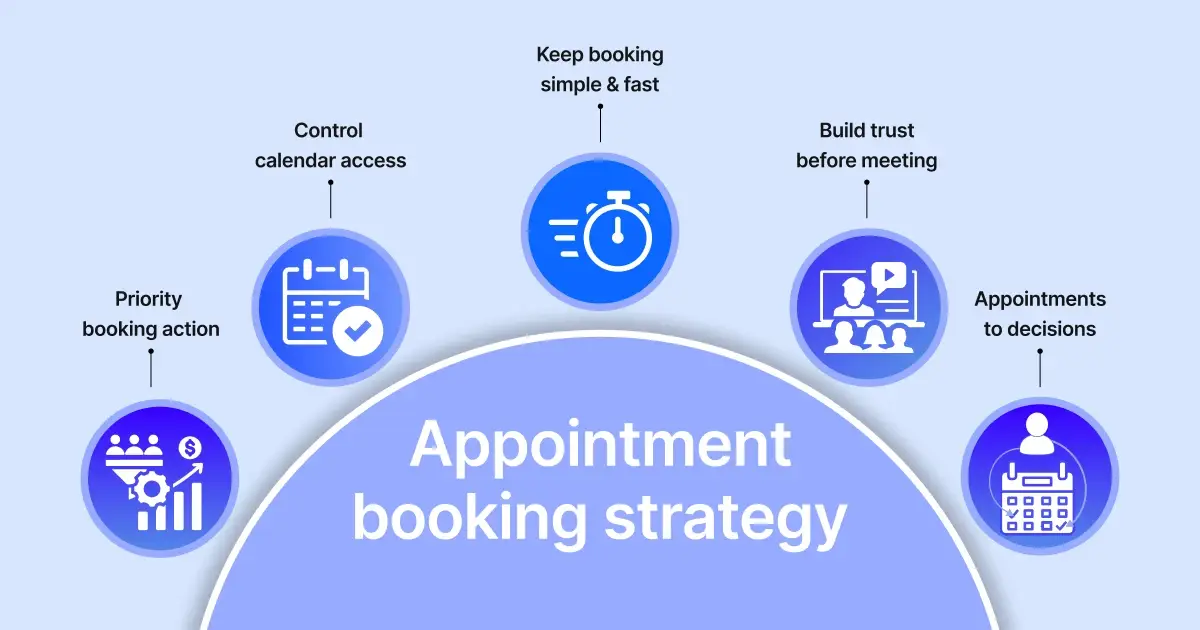
The five strategies below show how to use appointment booking to create momentum from the first click to a clear business decision.
1. Use appointment booking as the primary conversion action
Most businesses treat appointment booking as a secondary step. They focus on contact forms, email links, or “get in touch” buttons and leave booking for later. This creates delays and lowers conversion.
An effective appointment scheduling strategy makes booking the main action you want users to take.
When a lead is interested, they should be able to book a meeting immediately. So, guide them straight into a conversation. To apply this strategy, focus on placing booking calls-to-action on high-intent pages, such as:
- Service pages
- Pricing pages
- Case studies
- Key blog posts
The goal is simple. When someone is ready to talk, booking should be the easiest next step.
How do you manage your booking calendar for business
This is easier to execute when your booking tool is flexible and fast.
With WPTimetics, you can place booking buttons or links anywhere on your site and let leads book based on your real availability.
There is no waiting, no manual coordination, and no extra steps for the user.
When appointment booking becomes your primary conversion action, you stop losing leads to delays and start closing deals faster.
2. Control who gets access to your booking calendar
Not every lead is ready for a call. When anyone can book your calendar without context, you waste time on low-intent conversations and miss focus on serious prospects.
A strong appointment booking strategy controls access to your calendar.
Before a meeting is booked, you should understand who the lead is and what they need. This helps you prioritize high-quality leads and prepare for more productive conversations.
To apply this strategy, add simple qualification steps before booking, such as:
- Asking about their goal or problem
- Understanding their timeline
- Identifying the type of service they need
This ensures the right people book the correct kind of appointment.
How to control your booking calendar in your own way
This strategy works when your booking system has advanced customization features.
In WPTimetics, you can add custom questions to your booking form and use different appointment types based on user needs. Leads answer a few questions before booking, so you know who you are talking to before the meeting starts.
By controlling who gets access to your calendar, you reduce wasted calls, improve lead quality, and spend more time closing deals instead of filtering inquiries.
3. Keep your booking system simple, faster, and professional
A complicated booking process pushes leads away. Long forms, too many steps, and unclear instructions create friction. Even interested leads may leave if booking feels slow or confusing.
A strong appointment scheduling strategy focuses on simplicity.
Your booking flow should feel easy from start to finish. Leads should understand what to do, how long it takes, and what happens next. The fewer steps involved, the higher the chance they will complete the booking.
To apply this strategy, your booking system should:
- Ask only for essential information
- Use a single, clear booking flow
- Work smoothly on mobile and desktop
When booking feels simple, more leads follow through.
Make your booking form simple and as fast as possible
Booking experiences must be focused and clean, faster, and easy cancel or reschedule policy.
It’s easy to create a one-step booking flow with WPTimetics. You decide what information to collect, and leads can book, cancel, and reschedule appointments in seconds without confusion.
By keeping your booking system simple and fast, you reduce drop-offs and make it easier for interested leads to take action while their intent is still high.
4. Build confidence before the meeting happens
Many leads book an appointment but still feel unsure. They do not know what the meeting is about, what will be discussed, or what they need to prepare. This uncertainty leads to no-shows or low-quality conversations.
A strong appointment booking strategy builds confidence before the meeting starts.
When leads feel informed and prepared, they show up on time and engage better. Clear communication before the appointment reduces anxiety and sets the right expectations.
To apply this strategy, make sure your booking process clearly explains:
- What the meeting is about
- How long the meeting will take
- What the lead should expect next
This clarity builds trust even before the first conversation.
How you sent booking reminders and gave them time to prepare
You can send confirmation and reminder emails that clearly explain the meeting details in the WPTimetics dashboard. Leads know when the meeting is, why it is happening, and how to get ready.
When people feel confident and prepared before the meeting, they are less likely to miss it and more likely to engage in meaningful conversations that turn into lasting clients.
5. Design every appointment to move toward a decision
Many appointments end without a clear outcome. The call finishes, both sides say “we’ll follow up,” and the deal slowly fades away. This happens when appointments are treated as conversations instead of conversion steps.
A strong appointment booking strategy gives every meeting a purpose.
Each appointment should lead to a clear next step. This could be a follow-up booking, a proposal, a payment, or a confirmed action. When the path is clear, leads are more likely to move forward.
To apply this strategy, plan each appointment around:
- A clear goal for the meeting
- A defined next step after the call
- A simple way for leads to take that next step
This turns meetings into progress, not just discussions.
Wrapping up
Appointment booking strategy is not just about filling your calendar. It is about guiding leads from interest to action clearly and simply.
When booking is included in your sales process, you cut down on waiting, avoid unhelpful calls, and have better talks with leads. Every step, from the first click to the final choice, affects whether a lead becomes a customer or not.
The strategies in this guide show how small changes in your booking process can really help.
With the proper setup and a tool like WPTimetics, you can make appointment booking a dependable system that enables you to get more sales without making more work for yourself.
Let’s combine WPTimetics and all these appointment booking strategies and see how quickly you can convert every lead into a valuable client.
FAQ
What is an appointment booking strategy?
An appointment booking strategy is a structured process that guides leads from initial interest to a confirmed meeting and a clear next step. It connects your booking system with your sales flow instead of treating scheduling as a separate task.
Why is an appointment booking plan important for conversion?
Without a clear strategy, leads face delays, confusion, or unnecessary steps. A strong appointment booking strategy reduces friction, qualifies leads early, and helps move conversations toward real decisions.
How many questions should I ask before someone books an appointment?
Keep it minimal. Two to four questions are usually enough to understand intent, goals, or service needs. This helps improve call quality without slowing down the booking process.
Should appointment booking be free or paid?
It depends on your business model and lead quality. Free bookings work well for early-stage conversations, while paid appointments can filter serious leads. Both approaches can be part of a strong booking strategy.
How does WPTimetics support an appointment booking strategy?
WPTimetics appointment booking plugin allows you to control availability, add custom booking questions, send automated notifications, and manage different appointment types. This helps you apply booking strategies without manual coordination.
Can WPTimetics be used for different types of businesses?
Yes. WPTimetics appointment booking plugin supports one-to-one and one-to-many appointments, making it suitable for consultants, coaches, and teams that rely on scheduled meetings.