Top 7 Best Service Booking Plugins for WordPress
 Shifat Jaman
46 minutes read
Shifat Jaman
46 minutes read 
Running a service-based business means dealing with bookings every day. Calls, emails, and messages can quickly turn into confusion. Time slots get missed. Clients wait for replies. Staff schedules become hard to track.
This is where service booking plugins for WordPress help.
These plugins help you manage appointments directly from your website. You can accept bookings, send reminders, handle payments, and more. But with many options available, it’s hard to know which one to use.
In this guide, we will share our top picks for the best service booking plugins you can use with WordPress in 2026. We’ll compare features, pricing, ease of use, and more.
Let’s get started.
Best WordPress service booking plugins comparison
| Plugin Name | Best For | Free Version | Key Strength |
| Booktics | Service businesses of all sizes | ✅ | All-in-one service and payment flow |
| Amelia | Salons, gyms, clinics | ✅ | Clean interface and automation |
| WP Booking Calendar | Rentals and simple bookings | ✅ | Date-based scheduling |
| Booknetic | Advanced service workflows | ❌ | Deep customization |
| Bookly | Freelancers and consultants | ✅ | Flexible booking forms |
| LatePoint | Small teams and solo owners | ✅ | Fast setup and simple UI |
| Simply Schedule Appointments | Coaches and beginners | ✅ | Easy setup wizard |
What to Look for in a Service-booking Plugin
Choosing a booking plugin for WordPress depends on what your business needs. But there are some common features that most service-based websites will benefit from. Below are a few things to check before you decide on a plugin:
- Service and availability management: A good WordPress service booking plugin should let you create services with clear durations. You should be able to control available days and time slots without manual work. This helps avoid double bookings and missed appointments.
- Staff and team scheduling: If you work with a team, staff scheduling matters. Look for plugins that let you set up group appointments and manage their working hours. This is important for salons, agencies, and clinics using online service booking WordPress systems.
- Simple booking flow for users: The booking form should be easy to understand. Visitors should be able to select a service, choose a time, and confirm the booking in a few steps. Complicated forms reduce completed bookings, even with the best service booking plugins.
- Payment options: If you plan to accept online payments, make sure the plugin supports payment gateways like Stripe, PayPal, or WooCommerce. Some plugins only offer this in paid versions, so review their pricing plans carefully.
- Calendar sync: Many businesses rely on external calendars like Google or Outlook. A good plugin should let you sync your bookings to avoid conflicts.
- Custom time slots and availability: Being able to control your schedule matters. Look for options like setting buffer times, custom time slots, and blocked dates.
- Email and SMS notifications: These help reduce no-shows and improve customer communication. Automated reminders and confirmations are helpful for both you and your clients.
How We Tested These Service-booking Plugins
We tested these online service booking plugins for WordPress the same way a real business owner would use them.
First, we installed each plugin on a clean WordPress site. We checked how long setup took and how clear the settings were. A good service scheduler plugin should not require long tutorials just to get started.
Next, we created sample services. This included setting service duration, available time slots, and booking limits. For team-based plugins, we also added staff members and assigned services to them. This helped us see how well each option handles real schedules.
We then tested the booking process from a visitor’s point of view. We checked how easy it was to select a service, choose a time, and complete a booking. Plugins with fewer steps and clear layouts performed better for online service booking use cases.
Payment support was also reviewed. We checked whether the plugin supports payments during booking and how clearly payment settings are explained. This is important for any appointment booking plugin used for paid services.
Based on this process, we shortlisted the plugins that offer a balanced experience for both site owners and customers.
Top Service-booking Plugins to Consider in 2026
Below are the top service booking plugins for WordPress in 2026. Each one has been tested for features, ease of use, and value to help you choose the right solution for your business.
Booktics
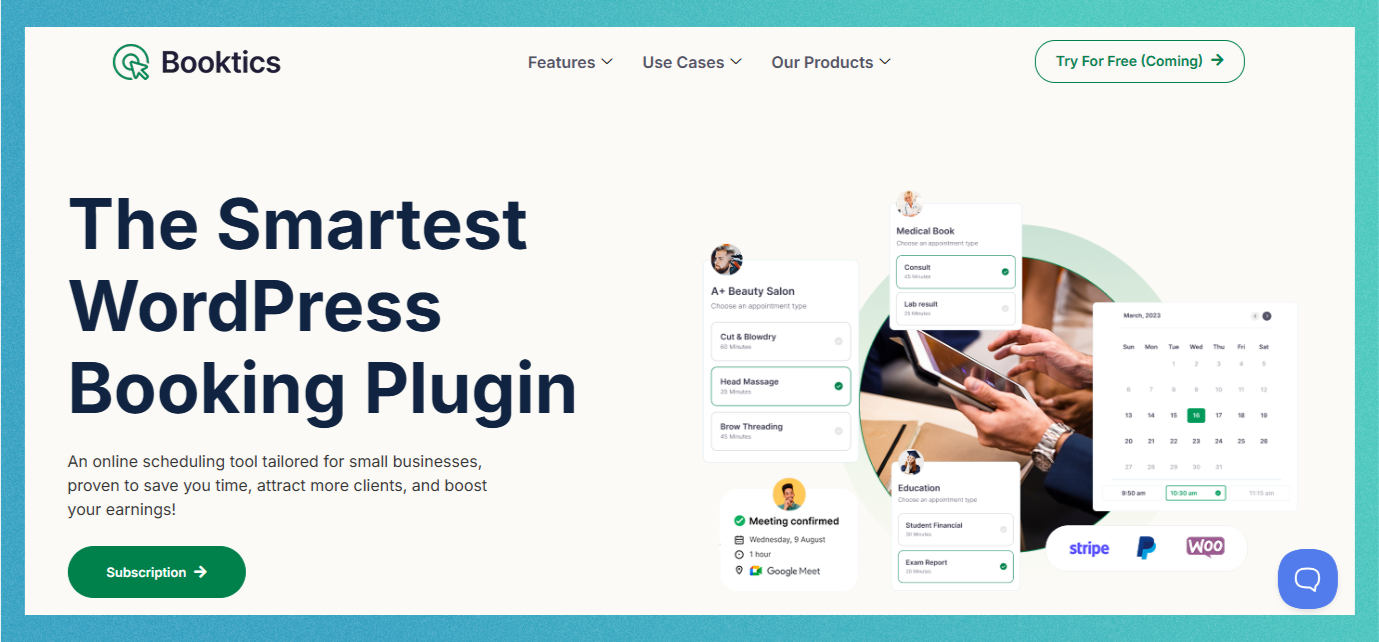
Booktics is a flexible and user-friendly WordPress service booking plugin made for service-based businesses. Whether you run a solo business or manage a team, Booktics helps you manage services, availability, staff schedules, and payments from one dashboard.
It works well for consultants, agencies, fitness trainers, clinics, and teams that need a clear booking flow to upsell their services. Clients can book services online, choose a time slot, and confirm without back-and-forth messages. This makes it a solid option for online service booking WordPress setups.
Key features
- Custom time slots, buffer times, and rescheduling options
- Admin and staff dashboards
- Support for group bookings and multiple appointments
- Built-in payment gateways like Stripe and PayPal
- Two-way calendar sync with Google Calendar
- Integration with Zoom for video appointments
- Multi-language and RTL support
- Mobile-friendly and responsive design
- Built-in reporting and analytics
What we liked most
- The setup process is simple and beginner-friendly
- Offers group booking and multi-appointment support
- Two-way calendar sync helps avoid double bookings
- Offers a good free version with useful features included
What could be better
- Fewer third-party integrations compared to older plugins
- Advanced options may take time to explore for first-time users
Pricing
Premium plan starts at $79/year
Amelia
Amelia is a popular WordPress service booking plugin used by many service-based businesses. It focuses on structured scheduling, staff management, recurring appointments, automated notifications, and support for multiple staff and locations.
This plugin is often chosen by salons, gyms, clinics, and consultants who need more control over appointments and staff schedules. It supports both in-person and virtual bookings, which makes it useful for different online service booking use cases.
Key features
- Mobile-friendly booking interface
- Google and Outlook Calendar sync
- Payment integration with PayPal, Stripe, and WooCommerce
- SMS, email, and WhatsApp notifications
- Zoom and Google Meet support for virtual appointments
- Admin dashboard with analytics
- Customer panel for managing bookings
- Support for recurring appointments
What we liked most
- Offers calendar sync, recurring bookings, and virtual meeting support
- Modern and responsive interface works well on mobile
- Automated reminders through SMS, email, and WhatsApp
- Integrates with Google Analytics for tracking conversions
What could be better
- Free version is limited to basic booking features
- No WooCommerce integration in the free plan
- Some features require higher-tier plans or paid add-ons
Pricing
Premium plans start at $49/year for one domain
WP Booking Calendar
WP Booking Calendar is one of the oldest and most established service booking plugins for WordPress. It allows you to accept and manage bookings directly from your website using a customizable calendar. This plugin is especially useful for property rentals, vacation bookings, or solo businesses that need a simple booking system.
It focuses more on traditional date-based scheduling and supports flexible pricing, custom time slots, and email notifications. For businesses with basic needs, it can still work as a service booking plugin, but with limits.
Key features
- Fully customizable booking forms
- Seasonal and duration-based pricing
- Email notifications and auto-approval options
- Supports partial payments and deposits
- 10+ payment methods (in premium version)
- iCal sync for calendar integration
- Multi-day and full-day booking support
- Admin panel for managing reservations
What we liked most
- Very reliable and stable plugin with long-term updates
- Supports both simple and advanced booking rules
- Includes flexible email and form customization
- Works well for multi-day and single-day bookings
What could be better
- No payment integration in the free version
- User interface feels outdated compared to newer plugins like Booktics
- Some features are locked behind premium add-ons
- Lacks advanced automation like SMS notifications or virtual meetings
Pricing
Premium plans start at $79/year for a single site
Booknetic
Booknetic is a premium appointment booking plugin for WordPress built for businesses that need advanced control. The plugin offers strong automation, multi-location support, and a flexible interface that works well across industries like salons, fitness centers, legal services, and clinics.
It also supports modern features like social login, custom form builders, and an Elementor widget to design the booking interface.
Key features
- Customizable booking panel and form builder
- Supports Google and Facebook login
- SMS, email, and WhatsApp notifications
- Multi-location and multi-staff support
- Drag-and-drop form builder
- Google ReCAPTCHA and OTP verification
- Sync with Google Calendar
- Works with WooCommerce and Zoom
What we liked most
- Offers a full automation system with staff and service control
- Highly customizable booking forms and layout
- Social login support adds convenience for users
- Supports various messaging tools like WhatsApp and Telegram
What could be better
- No free version is available
- Learning curve for non-technical users
- Some premium features require additional add-ons
- Documentation could be more detailed in some areas
Pricing
Basic plan starts at $79/year
Bookly
Bookly is another best service booking plugin that works well for freelancers and small service businesses. It focuses on a simple setup with room to expand through add-ons.
This plugin is often used by consultants, coaches, and solo professionals who need a clear booking form and basic scheduling. It can also support teams, but many advanced features are unlocked through paid add-ons.
Key features
- Mobile-friendly booking form
- Multi-step booking process with customizable fields
- WooCommerce and payment gateway integration (paid)
- Supports Google Calendar and Zoom
- Invoicing and tax setup options
- Email and SMS notification templates
- Multi-language and RTL support
- 40+ premium add-ons available
What we liked most
- Easy to set up and use, even for beginners
- Booking forms can be customized step-by-step
- Large library of add-ons for extra functionality
What could be better
- Many key features (like payments and staff scheduling) require paid add-ons
- Free version is quite limited
- Total cost can rise if you need multiple add-ons
- Interface could be more modern in some areas
Pricing
Premium version starts at $89/year, but add-ons are sold separately
LatePoint
LatePoint is a simple and lightweight WordPress scheduling plugin made for small business owners who want a fast setup and easy-to-use interface. It focuses on usability and speed, making it a good fit for personal trainers, consultants, tutors, and solo professionals.
Despite its clean interface, it still includes features like calendar sync, payment options, and staff management, which are helpful for growing businesses.
Key features
- Easy-to-use dashboard with a clean design
- Google Calendar sync and real-time booking updates
- Stripe and PayPal payment integration
- Google address autocomplete for booking forms
- Access roles and agent dashboards
- Booking bundles, coupons, and pricing options
- Mobile-responsive and fast-loading interface
- Native support for WordPress page builders
What we liked most
- Minimalist interface helps focus on core booking tasks
- Great for solo professionals and small teams
- Provides booking insights and agent-level control
- Booking refunds and access control are built in
What could be better
- Fewer third-party integrations compared to other plugins
- Some features require higher-tier plans
- Not ideal for large businesses or complex workflows
Pricing
Premium version starts at $99/year
Simply Schedule Appointments
Simply Schedule Appointments is a beginner-friendly WordPress service booking plugin that helps businesses manage appointments without complexity. It’s designed with a focus on ease of use and works well for coaches, freelancers, tutors, and small service providers.
It comes with a helpful setup wizard and includes key features like mobile responsiveness, appointment limits, and calendar controls. Premium plans add more functionality, like payment integration and team scheduling.
Key features
- Guided setup wizard for easy onboarding
- Exportable appointment lists (CSV)
- Twilio SMS notifications (premium)
- Mobile-friendly and responsive booking form
- Booking rules like per-day limits, minimum notice, and buffer time
- Multi-booking support for the same time slot
- Multiple calendar language support
- Google Calendar sync (premium)
What we liked most
- Very easy to set up, ideal for non-technical users
- Clean and simple user interface
- Flexible booking rules and appointment controls
- Useful for solo businesses and freelancers
What could be better
- Costly compare to Booktics, Amelia
- No WooCommerce integration in the free version
- Advanced features like payments and team scheduling require higher-tier plans
- Lacks deeper customization options compared to advanced plugins
- Limited design styling options without CSS
Pricing
Premium plans start at $129/year
Which Service Booking Plugin is the Best Solution for Your Business?
If you run a service-based website, having a reliable booking system is important. The right plugin saves time, reduces missed appointments, and helps your business run more smoothly.
In this guide, we reviewed some of the best service booking plugins for WordPress. Each one comes with its own strengths:
- Booktics is great for most small to mid-sized businesses, offering a complete set of features and lifetime pricing.
- Amelia is ideal if you want modern design and automated workflows.
- WP Booking Calendar works best for date-based bookings like rentals.
- Booknetic gives more control for advanced scheduling across multiple locations.
- LatePoint helps small teams start accepting bookings quickly.
- Bookly and Simply Schedule Appointments each serve specific needs depending on your team size, technical skill, and design preferences.
If you’re just starting or want a simple tool that works out of the box, Booktics is a strong choice. It combines essential features with ease of use and flexible pricing, making it a reliable WordPress service booking plugin for a wide range of businesses.
FAQs
What are service booking plugins for WordPress?
Service booking plugins for WordPress help businesses accept bookings online. They let customers choose a service, pick a time slot, and confirm an appointment without contacting you directly. These plugins handle scheduling, availability, and often payments.
What is the best service booking plugin for WordPress?
There’s no single best option for everyone. It depends on your needs. If you want an all-in-one tool with easy setup and a one-time payment, Booktics is a great choice. If you’re managing complex schedules or a larger team, Booknetic or Amelia might be better suited.
Can I accept online payments with a service booking plugin?
Yes, most premium WordPress service booking plugins support payment gateways like PayPal, Stripe, and WooCommerce. Plugins like Booktics, Amelia, Bookly, and Booknetic allow you to accept payments directly from your booking form.
Are there free booking plugins available?
Yes, several plugins on this list offer free versions, including Booktics, Bookly, Amelia, WP Booking Calendar, and Simply Schedule Appointments. However, features like payments, staff management, or calendar sync are usually only available in the paid versions.
What’s the easiest WordPress booking plugin to use?
Simply Schedule Appointments and LatePoint are very easy to set up and use, even if you have no technical background. Booktics also offers a simple setup with a clean dashboard, making it suitable for beginners.
Which plugin is best for calendar-based service scheduling?
If you rely on daily or date-based scheduling, WP Booking Calendar is a strong choice. It supports full-day or multi-day bookings and syncs with external calendars like Google Calendar and iCal.