Appointment Capacity Planning: How Many Can You Accept?
 Mayeesha Farin
92 minutes read
Mayeesha Farin
92 minutes read 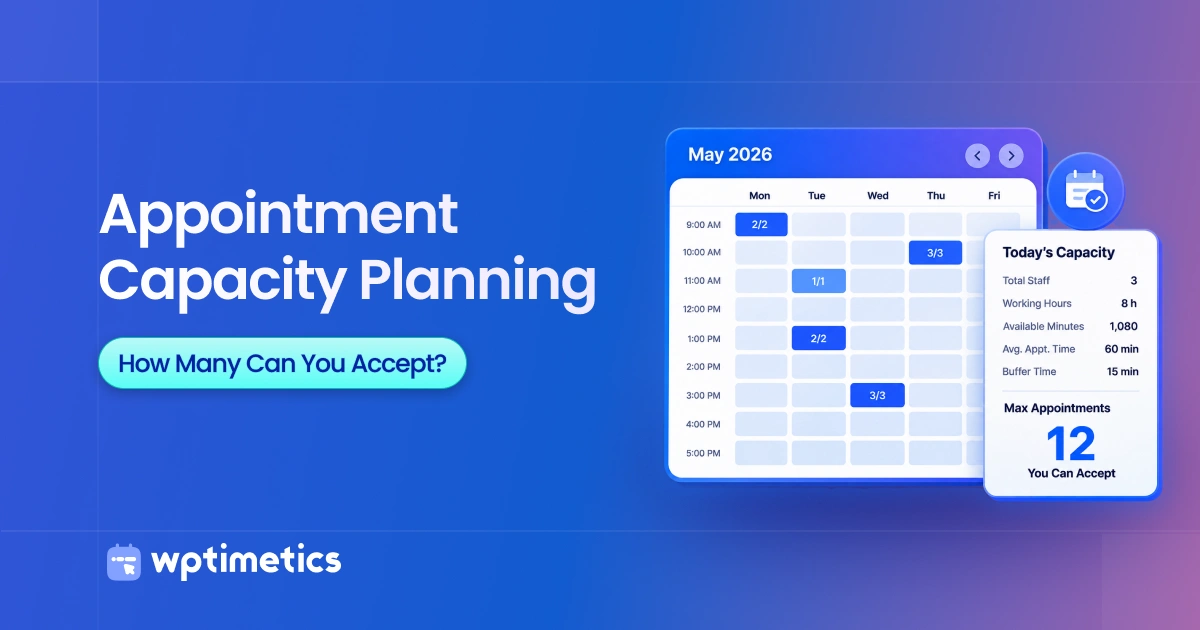
Appointment capacity planning helps you calculate how many bookings your business can handle within a day, week, or month without overloading staff or reducing service quality. It considers working hours, appointment length, buffer time, staff availability, rooms, equipment, and administrative tasks.
Capacity planning is also about deciding how to allocate limited appointment hours across services, especially when services differ in duration, revenue, staff requirements, or resource usage.
An open time slot does not always mean you can accept another booking. For example, a staff member may be available, but the required room or equipment may already be in use. Your actual capacity depends on the resource with the least availability.
In this guide, you will learn how to calculate your appointment capacity, prepare for peak demand, use your calendar more efficiently, and decide when to add staff or extend booking hours.
Key Takeaways
- Appointment capacity is the number of bookings your business can complete within a specific period.
- Your real capacity depends on staff hours, service length, buffer time, breaks, rooms, equipment, and administrative work.
- The resource with the lowest availability sets your maximum booking capacity.
- Different service lengths require separate calculations or a weighted average.
- Operating at full capacity may cause delays, staff overload, and lower service quality.
- Compare your available capacity with booking demand to identify busy periods and unused time.
- Review your capacity whenever working hours, services, staffing, or customer demand changes.
- When capacity is limited, compare revenue per occupied hour to understand which services make the most effective use of scarce booking time.
- Predictable cancellation and no-show data can inform controlled overbooking, but businesses should set a hard operational ceiling for days when every customer attends.
- Before hiring, compare the cost of additional capacity with the contribution margin from the extra appointments you expect to serve.
What Is Appointment Capacity Planning?
Appointment capacity planning is the process of calculating how many appointments your business can complete within a specific period without overloading staff or reducing service quality.
It goes beyond counting open calendar slots. Your actual booking capacity depends on several factors, including:
- Staff working hours and availability
- Appointment duration
- Preparation and buffer time
- Breaks and administrative tasks
- Staff skills and service assignments
- Available rooms, chairs, or equipment
- Customer demand during different periods
For example, a salon may have four available stylists but only two wash stations. Even if all four calendars are open, the shared resource may limit how many services the salon can provide at the same time.
Capacity planning helps you set realistic booking limits, reduce scheduling conflicts, distribute staff based on demand, and identify when you need more working hours or resources.
How Do You Calculate Appointment Capacity?
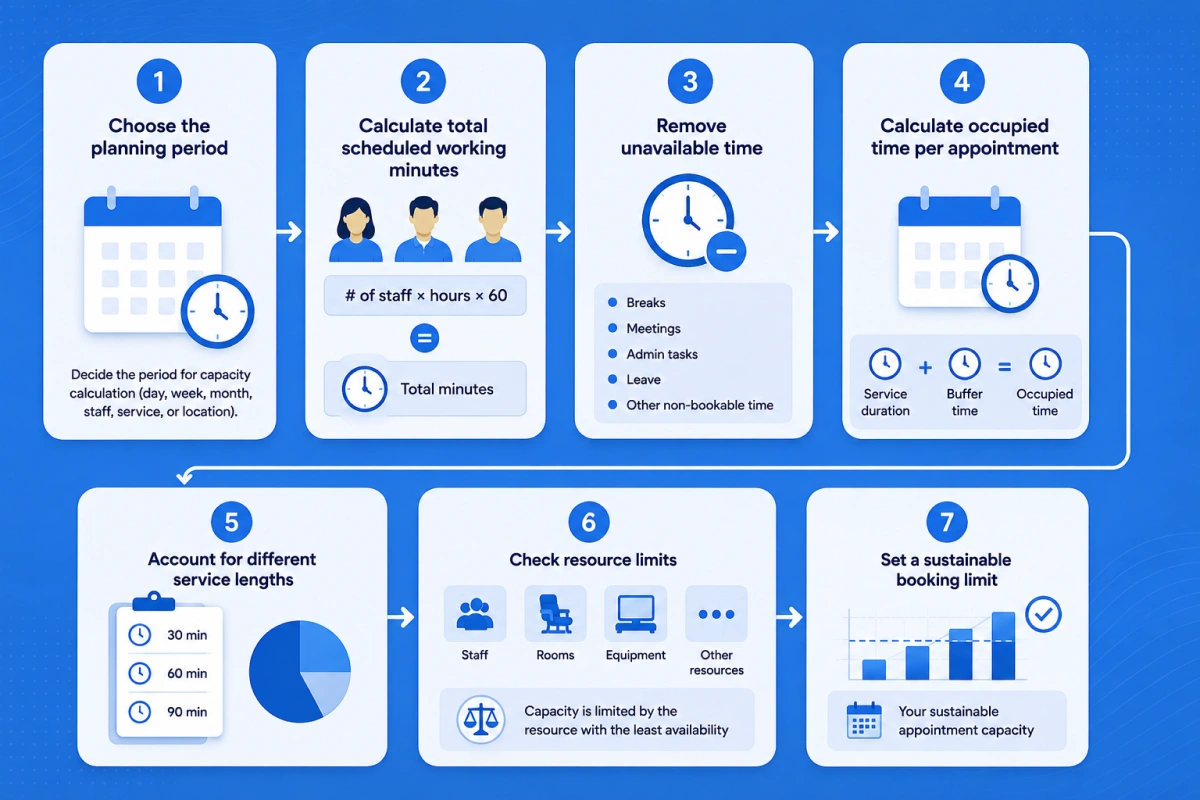
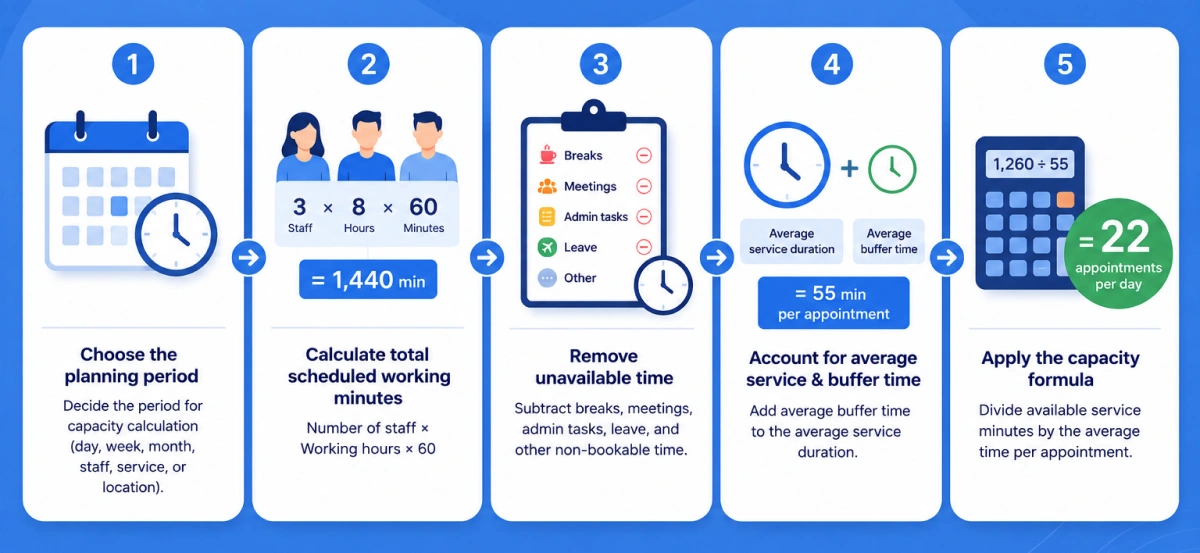
To calculate appointment capacity, divide your total available service time by the average time each appointment occupies, including buffer time.
Use this formula:
However, this basic formula may not show your full operating capacity. You also need to account for breaks, administrative tasks, different service lengths, staff qualifications, rooms, equipment, and other booking limits.
Step 1: Choose the planning period
First, decide the period for which you want to calculate capacity. You can measure it for:
- One day
- One week
- One month
- An individual staff member
- A specific service
- One business location
- Your entire business
Start with daily or weekly capacity because these periods make it easier to compare working hours with actual bookings. You can then combine the results to estimate monthly capacity.
You should also calculate capacity separately for each staff member, service, or location when their schedules and requirements differ. For example, a 30-minute consultation and a 90-minute treatment should not share the same capacity estimate.
Step 2: Calculate total scheduled working minutes
Add the scheduled working time of every staff member who can provide the service during your chosen period.
Use this formula:
For example, suppose three staff members each work eight hours per day:
The business has 1,440 total staff minutes available for that day. However, this is only the starting point. It does not yet account for lunch breaks, meetings, administrative work, leave, or other non-bookable time.
If staff members work different schedules, calculate their minutes separately and then add them together. Only include employees who have the skills and service assignments required for the appointments you are measuring.
Step 3: Remove unavailable time
Subtract any time that staff cannot use for customer appointments from the total scheduled working minutes.
Use this formula:
For example, the three staff members have 1,440 scheduled minutes. If breaks and administrative tasks take 180 minutes:
The business has 1,260 minutes available for appointments that day. Use this figure for the capacity calculation instead of the full scheduled time.
Keep buffer time separate at this stage if you plan to include it with each appointment in the next step. This prevents you from counting the same time twice.
Step 4: Calculate occupied time per appointment
Calculate the total calendar time each appointment uses. Include both the service duration and any buffer required before or after the appointment.
Use this formula:
For example, if a service takes 45 minutes and requires a 10-minute buffer:
Each appointment occupies 55 minutes of booking capacity, even though the customer receives a 45-minute service.
If preparation or cleanup time has already been removed as unavailable time, do not count it again as buffer time.
Step 5: Account for different service lengths
If your services have different durations, calculate a weighted average based on how often customers book each one. This gives you a more accurate capacity estimate than using a simple average.
Use this formula:
For example, if 50% of bookings occupy 40 minutes, 30% occupy 60 minutes, and 20% occupy 90 minutes, the weighted occupied time is 56 minutes.
The weighted occupied time is:
Based on the current service mix, each appointment occupies an average of 56 minutes.
Booking patterns may change by day, season, or location. Review recent booking data regularly and update the service shares when customer demand changes. You should also calculate high-demand or resource-heavy services separately when they have specific staff, room, or equipment requirements.
Step 6: Check resource limits
Time-based capacity is only usable when the staff, rooms, equipment, and other resources required for the appointment are available.
For example, if time capacity is 32 appointments, qualified labor capacity is 28, room capacity is 24, and equipment capacity is 30, actual capacity is 24 appointments.
Step 7: Set a sustainable booking limit
Set a booking limit that your team can manage consistently without causing regular delays, overtime, or lower service quality. This limit may be lower than your calculated effective capacity.
For example, if your effective capacity is 22 appointments per day, you may set a sustainable limit of 19 or 20 appointments. The remaining capacity provides room for:
- Appointments that take longer than expected
- Urgent or same-day requests
- Staff absences
- Equipment or room delays
- Administrative work
- Changes in customer demand
Your sustainable limit should reflect actual operating data. Review staff overtime, customer waiting times, appointment delays, missed breaks, and service quality. If these problems occur regularly, your current booking limit may be too high.
Do not assume that every business needs the same capacity cushion. A solo coach with predictable virtual sessions may operate closer to effective capacity than a clinic that handles urgent cases and variable appointment times. Test the limit, monitor the results, and adjust it as your staffing, services, and demand change.
What Does an Appointment Capacity Calculation Look Like?
Suppose a business has three staff members who each work eight hours per day. Each appointment takes 45 minutes and requires a 10-minute buffer.
Here is the full calculation:
| Capacity factor | Calculation | Result |
|---|---|---|
| Total scheduled time | 3 staff × 8 hours × 60 | 1,440 minutes |
| Breaks and administrative work | Total unavailable time | 180 minutes |
| Available service time | 1,440 − 180 | 1,260 minutes |
| Occupied time per appointment | 45 + 10 | 55 minutes |
| Effective appointment capacity | 1,260 ÷ 55 | 22.9 appointments |
Since the business cannot complete part of an appointment, it should round the result down to 22 appointments per day.
The calculation is:
This result represents the business’s effective time-based capacity. It still needs to confirm that enough qualified staff, rooms, and equipment are available to complete all 22 appointments.
The business may also set a sustainable limit of 19 or 20 appointments per day. This lower limit leaves space for delays, urgent requests, staff absences, and appointments that take longer than expected.
How Do Different Appointment Lengths Affect Capacity?
Different appointment lengths change how many bookings you can accept within the same working period. Longer services use more calendar time, while shorter services allow more bookings.
When you offer services with different durations, use a weighted average based on the share of bookings for each service.
| Service | Share of bookings | Duration with buffer |
|---|---|---|
| Consultation | 50% | 40 minutes |
| Standard session | 30% | 60 minutes |
| Extended session | 20% | 90 minutes |
Calculate the weighted appointment duration:
If the business has 1,260 available service minutes:
The estimated capacity is 22 appointments per day based on the current service mix.
However, the result may change when customers book more long sessions than usual. Review the calculation by day, staff member, or location when the service mix varies. You should also calculate each service separately if it requires specific staff, rooms, or equipment.
How Do You Prioritize Appointment Capacity by Revenue?
When appointment capacity is scarce, compare each service’s revenue per occupied hour. This shows how much revenue each service generates from the calendar time it consumes and can help you decide how to allocate high-demand appointment periods.
| Service | Revenue | Occupied Time | Revenue per Occupied Hour |
|---|---|---|---|
| Consultation | $60 | 30 min | $120/hour |
| Standard session | $100 | 60 min | $100/hour |
| Extended session | $180 | 90 min | $120/hour |
When peak capacity is scarce, this metric can help identify:
- Which services use peak-hour capacity most efficiently;
- Which services could be moved to quieter periods;
- Whether long appointments justify the time they consume;
- Which services justify adding staff/resources;
- Where high booking volume isn’t translating into proportional revenue.
Revenue per occupied hour should not be the only scheduling criterion. Customer commitments, recurring clients, service quality, staff skills, strategic services, and customer access may also affect how capacity should be allocated.
How Should Buffer Time Be Included in Booking Capacity?
Buffer time should count as occupied calendar time because another customer cannot book that period. Add the required buffer to the service duration when calculating appointment capacity.
For example, a 45-minute service with a 10-minute buffer occupies 55 minutes:
| Setup | Occupied time | Capacity in 480 minutes |
|---|---|---|
| 45-minute service without buffer | 45 minutes | 10 appointments |
| 45-minute service with a 10-minute buffer | 55 minutes | 8 appointments |
Buffer time may be needed for:
- Preparing the room or equipment
- Cleaning and resetting the service area
- Completing customer notes
- Traveling between appointments
- Handling minor delays
- Allowing staff to recover between demanding services
The required buffer may differ by service. A virtual consultation may need only five minutes for notes, while an in-person treatment may require additional preparation and cleanup.
Avoid removing necessary buffers simply to create more available slots. Doing so may increase the visible booking capacity but can also cause delays, missed breaks, and rushed service. Review actual appointment data to set a suitable buffer for each service.
How Do You Choose the Right Buffer Time?
Businesses should compare:
Scheduled duration vs actual completion/reset time
For example:
If a 45-minute service regularly requires another 8 minutes for notes and room reset, a 10-minute buffer may be more realistic than a generic 5-minute buffer.
How Do Staff, Rooms, and Equipment Limit Booking Capacity?
Staff, rooms, and equipment limit booking capacity when a service cannot proceed without them. Your actual capacity equals the lowest usable capacity among all required resources.
Staff availability
Staff capacity depends on more than the number of employees. You also need to consider:
- Individual working hours
- Breaks and planned leave
- Service assignments
- Staff qualifications
- Location schedules
- Maximum workload
For example, a clinic may have four available providers, but only two may be qualified to perform a specialist treatment. The capacity for that treatment depends on those two providers.
Qualified Labor as a Hard Capacity Ceiling
Labor capacity should be calculated using only the working minutes of employees qualified and assigned to perform the service.
Formula:
Example:
Suppose five employees are working, but only two can perform Service A. Those two employees provide 720 available qualified minutes. Service A occupies 60 minutes.
Therefore, Service A’s labor ceiling is 12 appointments, even if the wider team has enough time for more.
Then reinforce:
Rooms and physical spaces
A lack of suitable rooms can reduce capacity even when staff members have open schedules. This limit may apply to:
- Treatment rooms
- Consultation spaces
- Salon stations
- Meeting rooms
- Training areas
For example, four therapists cannot serve four clients at the same time if only three treatment rooms are available.
Shared equipment
Some appointments require equipment that multiple staff members share. Common examples include:
- Medical devices
- Salon wash stations
- Treatment tools
- Computers or testing equipment
- Vehicles for mobile services
If five employees share two pieces of essential equipment, that equipment may set the maximum number of appointments they can complete at the same time.
Calculate the usable capacity of each required resource separately. The lowest result becomes the maximum capacity for that service:
How Should You Allocate Staff During Peak Booking?
Allocate staff based on booking demand by day, time, service, and location. Using the same staffing level throughout the week can leave busy periods understaffed and quieter periods with unused capacity.
Compare booking requests with available slots to find capacity gaps:
| Time period | Booking requests | Available slots | Capacity gap |
|---|---|---|---|
| Monday morning | 18 | 12 | -6 |
| Monday afternoon | 8 | 15 | +7 |
| Saturday morning | 25 | 16 | -9 |
A negative capacity gap means demand exceeds availability. A positive gap means some capacity remains unused. In this example, the business needs more appointment capacity on Monday and Saturday mornings but has extra availability on Monday afternoon.
You can respond by:
- Moving some staff hours from quiet periods to peak periods
- Scheduling qualified staff when specific services are in high demand
- Extending booking hours during consistently busy periods
- Reducing unnecessary availability when demand is low
- Separating virtual and in-person appointment hours
- Comparing demand across different locations
Review several weeks or months of booking data before changing staff schedules. A single busy day may not represent a regular demand pattern. Also consider cancellations, no-shows, seasonal demand, and staff workload when deciding how many employees to schedule.
How Do Cancellations and No-Shows Affect Capacity Planning?
Cancellations and no-shows reduce the number of appointments your business completes. However, they do not automatically create safe room for overbooking because you cannot always predict which customers will cancel or fail to attend.
| Booking status | Meaning |
|---|---|
| Scheduled appointment | A slot reserved by a customer |
| Completed appointment | A booking that resulted in service delivery |
| Cancelled appointment | A booking removed before its scheduled time |
| No-show | A customer who did not attend |
| Recovered appointment | A cancelled slot filled by another customer |
Use this formula to calculate your no-show rate:
For example, if 8 customers miss appointments out of 200 scheduled bookings:
You can reduce lost capacity through:
- Automated email and SMS reminders
- Clear cancellation deadlines
- Online deposits or advance payments
- Easy cancellation and rescheduling
- Waitlists
- Short-notice booking lists
- Follow-up messages for repeated no-shows
A waitlist can help you recover capacity when customers cancel early enough. Track your cancellation recovery rate to see how often another customer fills the released slot.
Avoid overbooking based only on your average no-show rate. If all customers attend, your staff may face overlapping appointments, longer waiting times, and extra pressure. This risk requires particular care in clinics and other services where delays may affect customer safety or service quality.
Relevant read: How to Reduce No-Shows for Appointments Using Smart Reminders and Buffer Time
How Do You Forecast Future Appointment Demand?
Forecast future appointment demand by combining historical booking data with seasonal patterns, expected business growth, recurring bookings, promotions, and upcoming operational changes.
Capacity and demand are different. Capacity shows how many appointments you can provide, while demand shows how many appointments customers want. Calculate both separately before comparing them.
Review Historical Booking Data
Start with booking records from the past several weeks or months. Review:
- Total booking requests
- Scheduled appointments
- Completed appointments
- Cancellations and no-shows
- Waitlist entries
- Recovered cancellations
- Fully booked periods
- Unused appointment slots
Booking requests can show unmet demand that completed appointment data may miss. For example, customers may leave without booking when their preferred times are unavailable.
Identify Recurring Demand Patterns
Group your booking data by:
- Day of the week
- Time of day
- Week or month
- Season
- Service type
- Staff member
- Business location
For example, a salon may receive more bookings on Friday afternoons, while a clinic may experience higher demand on Monday mornings. These patterns help you place staff and resources where customers need them most.
Adjust for Known Changes
Historical data alone cannot predict every change. Adjust your forecast for:
- Marketing campaigns
- Holidays and seasonal events
- New services
- Price changes
- Staff leave
- Changes in opening hours
- Local events
- Business growth
- Recurring customer appointments
Use this simple formula when you have an expected growth rate:
For example, if your business receives an average of 500 booking requests per month and expects demand to grow by 10%:
Your forecast demand is 550 bookings for the month. Compare this figure with your sustainable capacity to identify whether you need to adjust schedules, extend booking hours, or add resources.
How Can You Improve Calendar Capacity Without Adding Staff?
You can improve calendar capacity by reducing avoidable gaps, matching staff schedules to customer demand, and recovering cancelled appointments. The goal is to use existing time more effectively without removing necessary breaks or overloading employees.
Here are ten ways to improve your available capacity:
- Move staff hours to peak periods: Shift working hours from quiet periods to times when booking requests regularly exceed available slots.
- Use suitable booking intervals: Set intervals that match your service lengths. Poorly chosen intervals can create short gaps that customers cannot book.
- Remove unnecessary gaps: Review the calendar for unused time between appointments and adjust availability where practical.
- Set service-specific buffers: Use different buffer times based on the preparation, cleanup, travel, or recovery time each service requires.
- Review actual completion times: Compare scheduled durations with real service times. Update services that regularly finish earlier or take longer than planned.
- Separate virtual and in-person schedules: Grouping appointments by format can reduce room changes, preparation time, and travel.
- Reduce low-demand availability: Move staff time away from periods that consistently receive few booking requests.
Calendar optimization should remove wasted time without removing breaks, preparation time, or other necessary operating limits. Monitor delays, staff workload, customer waiting times, and service quality after each schedule change.
Which Appointment Capacity Metrics Should You Track?
Track both available capacity and actual booking results. These metrics help you find unused time, overloaded periods, lost appointments, and opportunities to adjust staff schedules.
| Metric | Formula or purpose |
|---|---|
| Effective capacity | Realistic number of appointments available |
| Capacity utilization | Completed appointments ÷ effective capacity × 100 |
| Booking rate | Booked slots ÷ available slots × 100 |
| Completion rate | Completed appointments ÷ scheduled appointments × 100 |
| No-show rate | No-shows ÷ scheduled appointments × 100 |
| Cancellation rate | Cancellations ÷ scheduled appointments × 100 |
| Cancellation recovery rate | Refilled cancellations ÷ total cancellations × 100 |
| Peak-period utilization | Used capacity during high-demand periods |
| Revenue per available hour | Total Revenue ÷ available service hours |
| Revenue per occupied hour | Appointment/service revenue ÷ occupied appointment hours |
For example, suppose your effective monthly capacity is 500 appointments and you complete 400:
This means your business used 80% of its effective appointment capacity.
Do not rely only on an overall utilization rate. A monthly rate of 80% may appear reasonable, but it can hide fully booked mornings and mostly empty afternoons. Review these metrics by day, time, service, staff member, and location to understand where capacity problems occur.
Track the results over several weeks or months. This will help you separate regular booking patterns from short-term changes.
What Is a Good Appointment Capacity Utilization Rate?
There is no single appointment capacity utilization rate that works for every business. A suitable target depends on service duration, demand patterns, operating costs, staff workload, and how often appointments run longer than planned.
Use this formula:
For example, if your effective capacity is 100 appointments per week and you complete 82:
A very low utilization rate may indicate weak demand, excessive staff availability, unsuitable working hours, or appointment times that do not match customer preferences. However, aiming for continuous 100% utilization can also create problems. It leaves little room for:
- Appointments that take longer than expected
- Urgent or same-day requests
- Staff breaks and administrative tasks
- Equipment or room delays
- Staff absence
- Unexpected changes in demand
The right target also varies by business type. A coach offering fixed virtual sessions may operate closer to full capacity. A clinic may need more open time for urgent cases and unpredictable appointment lengths. A salon may need extra capacity during weekends while accepting lower utilization on quieter weekdays.
You can manage this uncertainty by setting a capacity cushion.
A capacity cushion is the portion of available time intentionally left unbooked to handle delays, unexpected demand, and operational changes.
Do not apply one fixed percentage to every service or working period. Set your utilization target using actual booking data, customer waiting times, staff overtime, missed breaks, service delays, and unused slots. Review the rate by day, time, service, and location because one overall figure may hide overloaded peak periods.
When Should You Add Staff or Extend Booking Hours?
Consider adding capacity when customer demand repeatedly exceeds your sustainable availability and schedule adjustments no longer solve the gap.
Common signs include:
- Peak periods remain fully booked for several weeks
- Waitlists continue to grow
- Customers wait too long for appointments
- Staff regularly work beyond scheduled hours
- High-demand services lack qualified providers
- Customers repeatedly request unavailable times
- Rooms or equipment remain available while staff capacity is full
- Cancelled appointments are quickly filled
- Overtime, delays, or missed breaks become frequent
Before hiring, identify when and why the shortage occurs. The right response depends on whether the capacity gap affects specific periods or the full schedule.
| Option | Best when |
|---|---|
| Reallocate current staff | Capacity exists during quieter periods |
| Extend working hours | Demand occurs outside current opening times |
| Add staff or resources | Demand exceeds capacity across several periods |
For example, if Saturday mornings are full but weekday afternoons remain quiet, moving staff hours may solve the problem. If customers regularly request evening appointments, extending working hours may be more suitable.
Hiring additional staff becomes reasonable when demand exceeds capacity across several days and the business cannot recover enough time through schedule changes.
Review booking requests, waitlist entries, staff overtime, customer waiting times, and lost booking opportunities before making the decision. Also confirm what limits capacity. Adding employees will not increase bookings if the actual bottleneck is a lack of rooms, equipment, or qualified providers.
How Can Booking Software Support Capacity Planning?
Booking software supports capacity planning by controlling when customers can book, which staff and resources are available, and how much time each appointment occupies. It also provides booking data that helps you compare available capacity with actual demand.
Useful capacity planning features include:
- Separate staff availability: Set individual working hours, breaks, leave, and service assignments.
- Service-specific durations: Assign an accurate appointment length to each service.
- Buffer time: Reserve preparation, cleanup, travel, or recovery time before or after bookings.
- Daily booking limits: Control how many appointments a staff member or business can accept.
- Resource scheduling: Prevent double bookings for rooms, equipment, chairs, or other shared resources.
- Recurring appointments: Reserve future capacity for repeat customers.
- Waitlists: Refill cancelled slots with customers who want an earlier appointment.
- Online cancellation and rescheduling: Release unavailable slots early enough for other customers to book.
- Calendar synchronization: Keep WordPress bookings aligned with external calendars and reduce scheduling conflicts.
- Booking and utilization reports: Compare available slots, completed appointments, cancellations, no-shows, and staff workload.
- Peak-hour data: Identify periods when booking demand regularly exceeds availability.
Booking software does not decide your sustainable capacity automatically. You still need to confirm service times, staff qualifications, breaks, room limits, equipment availability, and customer demand.
For example, a tool such as WP Timetics can manage staff schedules, service durations, buffer time, calendar synchronization, and appointment records in WordPress. You can then use this data to review capacity and adjust your booking limits based on how the business actually operates.
How Can WP Timetics Help Manage Appointment Capacity?
WP Timetics helps WordPress businesses control appointment availability based on staff schedules, service duration, buffer time, and existing calendar events. This reduces scheduling conflicts and helps the available booking slots match the team’s actual capacity.
With WP Timetics, you can:
- Create separate schedules for individual team members
- Assign eligible staff members to specific services
- Set different durations for each appointment type
- Add buffer time between appointments
- Define available days and working hours
- Manage team appointments from one dashboard
- Sync bookings with Google Calendar and Outlook
- Prevent customers from booking times that are already occupied
- Send automated booking confirmations and reminders
- Allow customers to choose from available services, staff, and time slots
For example, suppose a consultant works from 9:00 a.m. to 5:00 p.m., takes a one-hour break, and needs a 10-minute buffer after each 50-minute session. You can set these rules in WP Timetics so customers only see the appointment slots the consultant can realistically manage.
Calendar synchronization also matters when staff use personal or work calendars outside WordPress. Two-way Google Calendar and Outlook synchronization can block times that are already occupied and add new WordPress appointments to the connected calendar. This helps reduce double bookings.
WP Timetics does not calculate your sustainable capacity for you. You must first decide how many appointments each staff member can safely manage. You can then use its availability, service duration, buffer, team scheduling, and calendar controls to apply that capacity plan through your WordPress booking system.
How Do You Verify Your Appointment Capacity Plan?
Verify your appointment capacity plan by comparing the calculated capacity with actual bookings, completed appointments, delays, staff workload, and customer waiting times.
Follow this process:
- Calculate theoretical capacity: Measure the maximum number of appointments possible based on total scheduled working time.
- Remove unavailable time: Subtract breaks, meetings, administrative tasks, leave, and other non-bookable periods.
- Include service duration and buffers: Count the complete calendar time each appointment occupies.
- Check resource limits: Confirm that qualified staff, rooms, equipment, and other required resources are available.
- Compare capacity with historical demand: Review booking requests, completed appointments, cancellations, no-shows, waitlists, and unavailable-time requests.
- Test the schedule: Apply the calculated booking limit for one to four weeks to see how it works under normal operating conditions.
- Review the results: Check for delays, overtime, unused gaps, missed breaks, customer waiting times, and booking requests you could not accept.
- Adjust the sustainable limit: Reduce or increase the limit based on actual performance rather than the theoretical maximum.
- Repeat the review: Recalculate capacity whenever services, staffing, opening hours, locations, resources, or customer demand change.
For example, your calculation may show a capacity of 22 appointments per day. However, if staff regularly work overtime and customers experience delays at that level, your sustainable limit may be 19 or 20 appointments.
Capacity assumptions should come from booking records, staff schedules, service timing data, and operating policies rather than estimates alone. Regular testing helps you set a booking limit that your business can maintain without reducing service quality.
FAQ
How Should You Calculate Capacity for Group Appointments?
Count each group session as one calendar booking, but set a separate participant limit based on the available space, staff support, equipment, and service requirements.
Should Walk-In Customers Be Included in Capacity Planning?
Yes. Reserve part of your daily capacity for walk-ins if they regularly visit your business. Use historical walk-in data to estimate how much time to keep available.
How Do Part-Time Staff Affect Appointment Capacity?
Calculate each part-time employee’s available minutes separately. Include only their scheduled hours and subtract breaks, administrative work, and other unavailable time.
How Should You Plan Capacity Across Multiple Locations?
Calculate capacity separately for each location based on its staff, rooms, equipment, services, and demand. Do not combine the results until you have checked each location’s limits.
Do Group Bookings Increase Appointment Capacity?
Group bookings can serve more customers within one time slot. However, the participant limit still depends on staff support, available space, equipment, and service quality.
How Should Recurring Appointments Affect Future Capacity?
Recurring appointments reserve future booking slots before new customers can access them. Include these bookings when calculating available capacity for the coming weeks or months.
Should You Reserve Capacity for Emergency Appointments?
Reserve some open capacity if your business regularly handles urgent requests. The amount should reflect past demand without leaving too much bookable time unused.
Final Thoughts
Appointment capacity planning helps you set a booking limit your business can maintain without overloading staff or reducing service quality. Your real capacity depends on available staff time, service duration, buffer time, breaks, rooms, equipment, and customer demand.
Start by calculating your available service minutes, then check which required resource has the lowest capacity. Compare that result with actual booking data, cancellations, no-shows, delays, and peak-period demand to set a sustainable limit.
When demand exceeds capacity, compare revenue per occupied hour and the contribution margin from additional appointments before deciding whether to reallocate existing capacity, extend hours, or hire.
Review your plan whenever staffing, services, working hours, resources, or booking patterns change. If you use WordPress, WP Timetics can help you apply these limits through staff schedules, service durations, buffer times, and calendar synchronization.